Are looking for a method to save Outlook PST files to multiple file formats ? Then read below and get the ideal solution to solve your problem. But first, let’s find out a few facts about the app and how to save MS Outlook data files to another application.
MS Outlook, as we all know is one of the popularly used application. Almost all of us have used this app once in our life time and must be aware of the corruption issues that it used to threw on us when its supported PST file used to reach its maximum storage limit. The earlier editions of Outlook (from 97 to 2000) supported ANSI PST file with storage limit of 2GB, which was quite high in those times, but as businesses grew, Outlook started created problems as it failed to receive new messages citing, maximum storage limit reached issues. To help users solve these problems, Microsoft with Outlook 2003 increased its PST storage limit to 20 GB which eventually got inflated to 50 GB with Outlook 2013.
How to Get PST File from Outlook 2013/2016?
- Open MS Outlook
- Go to File >> Open & Export >> Import/Export
- Choose Export to a File option >> Next
- Choose Outlook Data File (.pst) >> Next
- From the list of configured email accounts, choose the one that you want to export
- Choose “Include Sub folders” and click Next
- Now choose the destination location to save PST file using Browse option. Provide a name to the PST and click OK. Now choose desired options and finally click Finish.
- Outlook will start the process of exporting PST file and will prompt you to provide a password. You can either enter a password or leave it blank and then click OK.
- After a few minutes, your selected Outlook user account data will be exported and saved in PST file.
Why Is It Risky to Save Outlook Data File as PST File?
Although Outlook is the most used app, keeping its data backed up in PST is still not the good idea because of the following reasons :
- PST files are prone to corruption : The storage limit of PST file is 50GB for Outlook 2016 and 2013 and once the data reaches above this limit, chances are that your PST file become corrupted.
- PST files are accessible only to local systems : Once you save your Outlook data in PST file, it becomes a local copy, accessible in that that system only. You can access them via shared network or Exchange Server.
- PST Files are recognized by Outlook only : PST is the proprietary format of Outlook and is supported by the app only. If someone wants to open and access PST file, then he/she must have Outlook installed in the system. And for accessing PST files in some other application then it must be converted into the app’s supported file format.
How to Save Microsoft Outlook Data to Another Format safely?
Considering the issues with PST files users search for solutions to convert them into some better alternatives so as to access them in other applications like Thunderbird, Mac Mail, Windows Live Mail, eM Client etc. some even want to secure them by saving them as PDF documents. Whichever option they choose, the first question that comes to their mind is how to save MS Outlook data to other format?
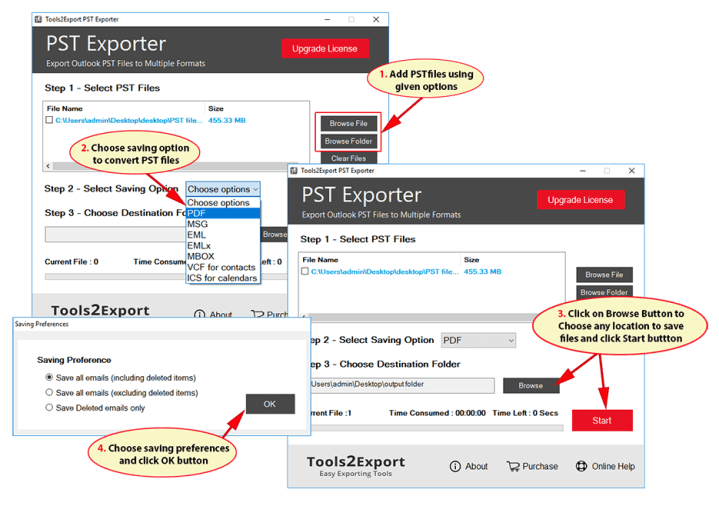
PST Converter is a smart choice here that provides expert solution to save Outlook data file to innumerable useful file formats – MBOX, PDF, EML, MSG, EMLX. The tool provides exact solution to save Outlook emails with all its properties like Meta headers, formatting, images, links, attachments etc. Now you can also save Outlook contacts and calendars to their standard formats – vCard and ICS respectively. Nowdays, users have very less time and need a quick solution to move their unlimited PST files and for that the tool supports Browse Folder option that allows conversion of multiple Outlook PST files at once. PST Converter is a Windows based application that supports all Windows (32bit and 64bit) editions – 10, 8.1, 8, 7 etc. The software has a simple GUI that allows both technical and non-technical users to effortlessly use it and save Outlook data file to any supported file format, as showing in below image :
Final Verdict
PST Converter is the ultimate tool for users who want to save MS Outlook data to other applications with ease. For their convenience, the tool provides free demonstration about its working process and supports to convert first 20 emails/contacts and calendar entries to desired format, free of charge.
 TechnoSpot